> ## Documentation Index
> Fetch the complete documentation index at: https://docs.memobase.io/llms.txt
> Use this file to discover all available pages before exploring further.
# Using Memobase with the OpenAI API
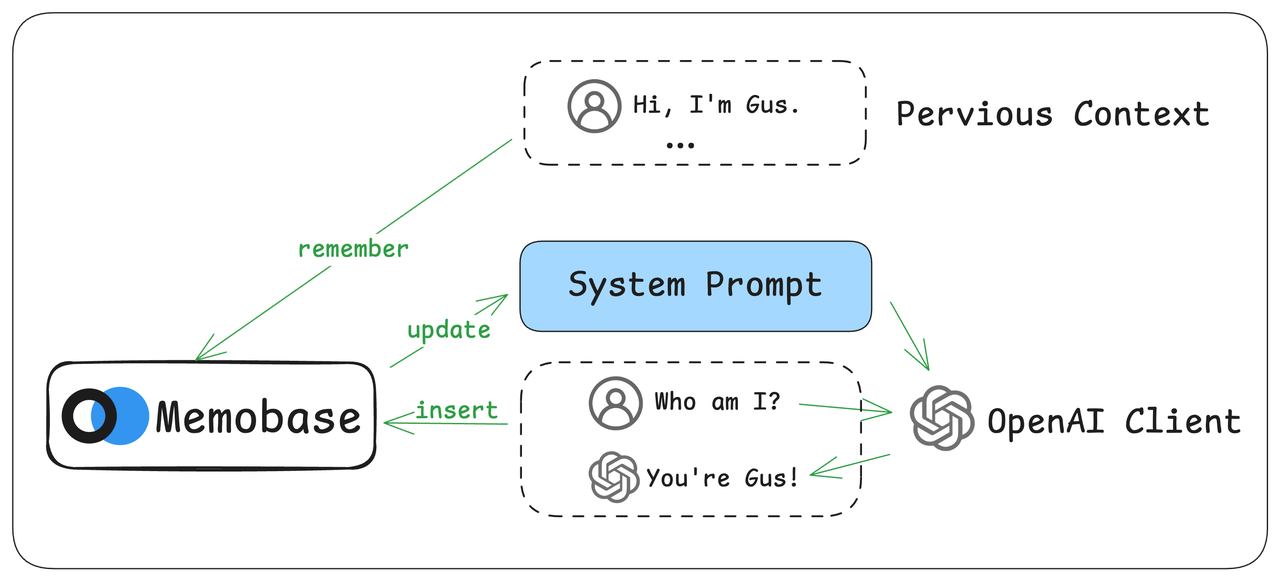 Memobase integrates with the OpenAI API, allowing you to add long-term memory to chat completions without altering your existing code. This patch works with the official OpenAI SDK and any other OpenAI-compatible provider.
## Setup
1. **Install SDKs**: Ensure both the Memobase and OpenAI Python SDKs are installed.
```bash theme={null}
pip install memobase openai
```
2. **Initialize Clients**: Create instances of both the OpenAI and Memobase clients.
```python theme={null}
from openai import OpenAI
from memobase import MemoBaseClient
client = OpenAI()
mb_client = MemoBaseClient(
project_url=YOUR_PROJECT_URL,
api_key=YOUR_API_KEY,
)
```
You can find your `project_url` and `api_key` after [setting up your backend](/quickstart#memobase-backend).
## Patch Memory
Apply the Memobase memory patch to your OpenAI client instance with a single function call.
```python theme={null}
from memobase.patch.openai import openai_memory
client = openai_memory(client, mb_client)
```
## Usage
1. To enable memory, simply add a `user_id` to your standard API call. The client will automatically handle the memory context.
```python OpenAI (Original) theme={null}
client.chat.completions.create(
messages=[
{"role": "user", "content": "My name is Gus"},
],
model="gpt-4o"
)
```
```python OpenAI with Memory theme={null}
client.chat.completions.create(
messages=[
{"role": "user", "content": "My name is Gus"},
],
model="gpt-4o",
user_id="test_user_123",
)
```
2. If no `user_id` is passed, the client functions exactly like the original OpenAI client.
3. By default, memory processing is not immediate. User interactions are collected in a buffer to optimize performance. You can manually trigger processing using the `flush` method:
```python theme={null}
client.flush("test_user_123")
```
## Verifying Memory Retention
Once a user's information is captured, it can be recalled in subsequent, separate conversations.
```python OpenAI (No Memory) theme={null}
# In a new session
response = client.chat.completions.create(
messages=[
{"role": "user", "content": "What is my name?"},
],
model="gpt-4o"
)
# Assistant: "I'm sorry, I don't have access to personal information..."
```
```python OpenAI with Memory theme={null}
# In a new session
response = client.chat.completions.create(
messages=[
{"role": "user", "content": "What is my name?"},
],
model="gpt-4o",
user_id="test_user_123",
)
# Assistant: "Your name is Gus."
```
## How It Works
The `openai_memory` function wraps the OpenAI client with two key actions:
1. **Before Request**: It retrieves the user's memory context from Memobase and injects it into the prompt.
2. **After Response**: It saves only the **latest** user query and assistant response to the memory buffer.
For example, if your message history is:
```json theme={null}
[
{"role": "user", "content": "My name is Gus"},
{"role": "assistant", "content": "Hello Gus! How can I help you?"},
{"role": "user", "content": "What is my name?"}
]
```
And the final response is `Your name is Gus.`, Memobase will only store the last exchange. This is equivalent to:
```python theme={null}
u.insert(
ChatBlob(messages=[
{"role": "user", "content": "What is my name?"},
{"role": "assistant", "content": "Your name is Gus."},
])
)
```
This design ensures you can manage short-term conversation history within your API calls as usual, while Memobase prevents duplicate entries in the long-term memory.
The full implementation script is available [here](https://github.com/memodb-io/memobase/blob/main/assets/openai_memory.py).
## Advanced Usage
### Custom Parameters
You can pass additional arguments to `openai_memory` to customize its behavior:
* `max_context_size`: Controls the maximum token size of the injected memory context. Defaults to `1000`.
```python theme={null}
client = openai_memory(client, mb_client, max_context_size=500)
```
* `additional_memory_prompt`: Provides a meta-prompt to guide the LLM on how to use the memory.
```python theme={null}
# Example: Encourage personalization
prompt = "Always use the user's memory to provide a personalized answer."
client = openai_memory(client, mb_client, additional_memory_prompt=prompt)
```
### Patched Methods
The patched client includes new helper methods:
* `client.get_memory_prompt("user_id")`: Returns the current memory prompt that will be injected for a given user.
* `client.flush("user_id")`: Immediately processes the memory buffer for a user. Call this if you need to see memory updates reflected instantly.
Memobase integrates with the OpenAI API, allowing you to add long-term memory to chat completions without altering your existing code. This patch works with the official OpenAI SDK and any other OpenAI-compatible provider.
## Setup
1. **Install SDKs**: Ensure both the Memobase and OpenAI Python SDKs are installed.
```bash theme={null}
pip install memobase openai
```
2. **Initialize Clients**: Create instances of both the OpenAI and Memobase clients.
```python theme={null}
from openai import OpenAI
from memobase import MemoBaseClient
client = OpenAI()
mb_client = MemoBaseClient(
project_url=YOUR_PROJECT_URL,
api_key=YOUR_API_KEY,
)
```
You can find your `project_url` and `api_key` after [setting up your backend](/quickstart#memobase-backend).
## Patch Memory
Apply the Memobase memory patch to your OpenAI client instance with a single function call.
```python theme={null}
from memobase.patch.openai import openai_memory
client = openai_memory(client, mb_client)
```
## Usage
1. To enable memory, simply add a `user_id` to your standard API call. The client will automatically handle the memory context.
```python OpenAI (Original) theme={null}
client.chat.completions.create(
messages=[
{"role": "user", "content": "My name is Gus"},
],
model="gpt-4o"
)
```
```python OpenAI with Memory theme={null}
client.chat.completions.create(
messages=[
{"role": "user", "content": "My name is Gus"},
],
model="gpt-4o",
user_id="test_user_123",
)
```
2. If no `user_id` is passed, the client functions exactly like the original OpenAI client.
3. By default, memory processing is not immediate. User interactions are collected in a buffer to optimize performance. You can manually trigger processing using the `flush` method:
```python theme={null}
client.flush("test_user_123")
```
## Verifying Memory Retention
Once a user's information is captured, it can be recalled in subsequent, separate conversations.
```python OpenAI (No Memory) theme={null}
# In a new session
response = client.chat.completions.create(
messages=[
{"role": "user", "content": "What is my name?"},
],
model="gpt-4o"
)
# Assistant: "I'm sorry, I don't have access to personal information..."
```
```python OpenAI with Memory theme={null}
# In a new session
response = client.chat.completions.create(
messages=[
{"role": "user", "content": "What is my name?"},
],
model="gpt-4o",
user_id="test_user_123",
)
# Assistant: "Your name is Gus."
```
## How It Works
The `openai_memory` function wraps the OpenAI client with two key actions:
1. **Before Request**: It retrieves the user's memory context from Memobase and injects it into the prompt.
2. **After Response**: It saves only the **latest** user query and assistant response to the memory buffer.
For example, if your message history is:
```json theme={null}
[
{"role": "user", "content": "My name is Gus"},
{"role": "assistant", "content": "Hello Gus! How can I help you?"},
{"role": "user", "content": "What is my name?"}
]
```
And the final response is `Your name is Gus.`, Memobase will only store the last exchange. This is equivalent to:
```python theme={null}
u.insert(
ChatBlob(messages=[
{"role": "user", "content": "What is my name?"},
{"role": "assistant", "content": "Your name is Gus."},
])
)
```
This design ensures you can manage short-term conversation history within your API calls as usual, while Memobase prevents duplicate entries in the long-term memory.
The full implementation script is available [here](https://github.com/memodb-io/memobase/blob/main/assets/openai_memory.py).
## Advanced Usage
### Custom Parameters
You can pass additional arguments to `openai_memory` to customize its behavior:
* `max_context_size`: Controls the maximum token size of the injected memory context. Defaults to `1000`.
```python theme={null}
client = openai_memory(client, mb_client, max_context_size=500)
```
* `additional_memory_prompt`: Provides a meta-prompt to guide the LLM on how to use the memory.
```python theme={null}
# Example: Encourage personalization
prompt = "Always use the user's memory to provide a personalized answer."
client = openai_memory(client, mb_client, additional_memory_prompt=prompt)
```
### Patched Methods
The patched client includes new helper methods:
* `client.get_memory_prompt("user_id")`: Returns the current memory prompt that will be injected for a given user.
* `client.flush("user_id")`: Immediately processes the memory buffer for a user. Call this if you need to see memory updates reflected instantly.