> ## Documentation Index
> Fetch the complete documentation index at: https://docs.memobase.io/llms.txt
> Use this file to discover all available pages before exploring further.
# OpenAI Client with User Memory
A key feature of Memobase is its ability to remember user preferences from conversation history. This tutorial demonstrates how to integrate this memory capability directly into the OpenAI client.
While Memobase offers a simple [patch](/practices/openai) for this, the following sections provide a detailed breakdown of the implementation.
## Setup
1. **Get API Keys**: Obtain an API key from [Memobase](https://www.memobase.io/en) or run a [local server](https://github.com/memodb-io/memobase/tree/dev/src/server).
2. **Configure Environment Variables**:
```bash theme={null}
OPENAI_API_KEY="your_openai_api_key"
MEMOBASE_URL="https://api.memobase.dev"
MEMOBASE_API_KEY="your_memobase_api_key"
```
3. **Install Dependencies**:
```bash theme={null}
pip install openai memobase
```
## Code Breakdown
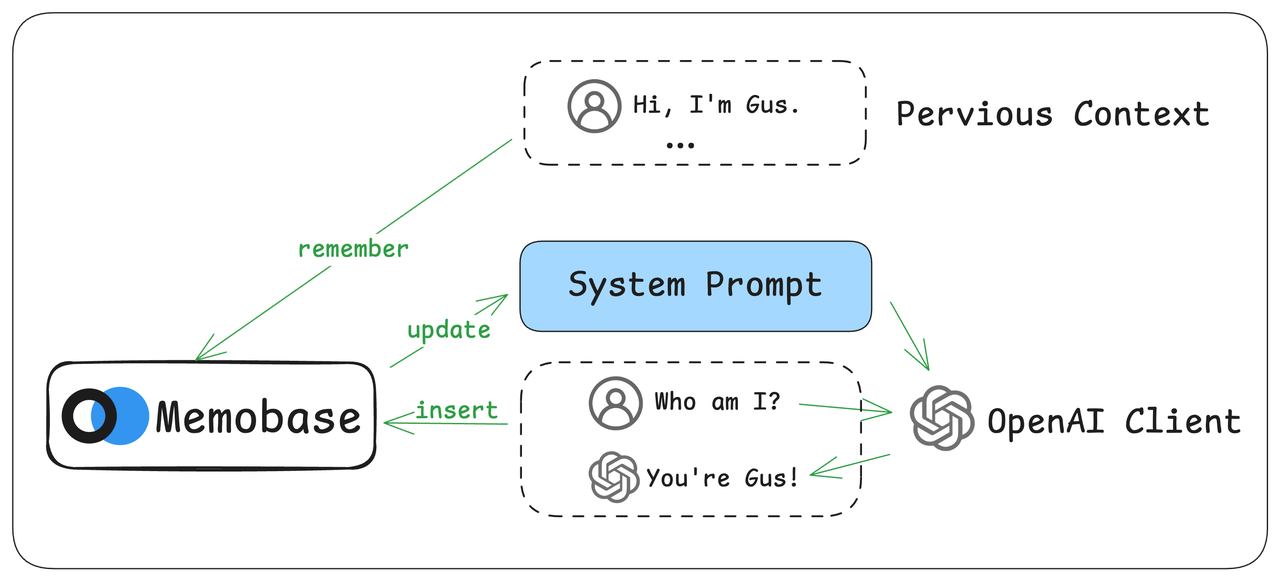 The implementation involves three main steps:
1. **Wrap the OpenAI client**: This allows us to intercept chat messages and inject memory context into prompts.
2. **Integrate Memobase APIs**: Use the wrappers to store chat history and retrieve user memories.
3. **Test**: Verify that the memory feature functions correctly.
> You can find the [full source code](https://github.com/memodb-io/memobase/blob/main/src/client/memobase/patch/openai.py) on GitHub.
### Basic Setup
First, initialize the OpenAI and Memobase clients.
```python theme={null}
import os
from memobase import MemoBaseClient
from openai import OpenAI
client = OpenAI()
mb_client = MemoBaseClient(
api_key=os.getenv("MEMOBASE_API_KEY"),
project_url=os.getenv("MEMOBASE_URL"),
)
```
### Wrapping the OpenAI Client
We use duck typing to wrap the OpenAI client. This approach avoids altering the original client's class structure.
```python theme={null}
def openai_memory(
openai_client: OpenAI | AsyncOpenAI,
mb_client: MemoBaseClient
) -> OpenAI | AsyncOpenAI:
if hasattr(openai_client, "_memobase_patched"):
return openai_client
openai_client._memobase_patched = True
openai_client.chat.completions.create = _sync_chat(
openai_client, mb_client
)
```
This simplified code does two things:
* It checks if the client has already been patched to prevent applying the wrapper multiple times.
* It replaces the standard `chat.completions.create` method with our custom `_sync_chat` function, which will contain the memory logic.
### The New `chat.completions.create` Method
Our new `chat.completions.create` method must meet several requirements:
* Accept a `user_id` to enable user-specific memory.
* Support all original arguments to ensure backward compatibility.
* Return the same data types, including support for streaming.
* Maintain performance comparable to the original method.
First, we ensure that calls without a `user_id` are passed directly to the original method.
```python theme={null}
def _sync_chat(
client: OpenAI,
mb_client: MemoBaseClient,
):
# Save the original create method
_create_chat = client.chat.completions.create
def sync_chat(*args, **kwargs) -> ChatCompletion | Stream[ChatCompletionChunk]:
is_streaming = kwargs.get("stream", False)
# If no user_id, call the original method
if "user_id" not in kwargs:
return _create_chat(*args, **kwargs)
# Pop user_id and convert it to UUID for Memobase
user_id = string_to_uuid(kwargs.pop("user_id"))
...
return sync_chat
```
The wrapper passes all arguments (`*args`, `**kwargs`) to the original function, preserving its behavior. Memobase uses UUIDs to identify users, so we convert the provided `user_id` (which can be any string) into a UUID.
If a `user_id` is present, the workflow is:
1. Get or create the user in Memobase.
2. Inject the user's memory context into the message list.
3. Call the original `create` method with the modified messages.
4. Save the new conversation to Memobase for future recall.
Here is the implementation logic:
```python theme={null}
def _sync_chat(client: OpenAI, mb_client: MemoBaseClient):
_create_chat = client.chat.completions.create
def sync_chat(*args, **kwargs) -> ChatCompletion | Stream[ChatCompletionChunk]:
# ... existing code for handling no user_id ...
user_query = kwargs["messages"][-1]
if user_query["role"] != "user":
LOG.warning(f"Last message is not from the user: {user_query}")
return _create_chat(*args, **kwargs)
# 1. Get or create user
u = mb_client.get_or_create_user(user_id)
# 2. Inject user context
kwargs["messages"] = user_context_insert(
kwargs["messages"], u
)
# 3. Call original method
response = _create_chat(*args, **kwargs)
# 4. Save conversation (details below)
# ... handle streaming and non-streaming cases
```
### Enhancing Messages with User Context
The `user_context_insert` function injects the user's memory into the prompt.
```python theme={null}
PROMPT = '''
--# ADDITIONAL INFO #--
{user_context}
{additional_memory_prompt}
--# DONE #--'''
def user_context_insert(
messages, u: User, additional_memory_prompt: str="", max_context_size: int = 750
):
# Retrieve user's memory from Memobase
context = u.context(max_token_size=max_context_size)
if not context:
return messages
# Format the context into a system prompt
sys_prompt = PROMPT.format(
user_context=context, additional_memory_prompt=additional_memory_prompt
)
# Add the context to the list of messages
if messages and messages[0]["role"] == "system":
messages[0]["content"] += sys_prompt
else:
messages.insert(0, {"role": "system", "content": sys_prompt.strip()})
return messages
```
This function retrieves the user's context from Memobase, formats it into a special system prompt, and prepends it to the message list sent to OpenAI.
### Saving Conversations
After receiving a response from OpenAI, we save the conversation to Memobase to build the user's memory. This is done asynchronously using a background thread to avoid blocking.
```python theme={null}
def add_message_to_user(messages: ChatBlob, user: User):
try:
user.insert(messages)
LOG.debug(f"Inserted messages for user {user.id}")
except ServerError as e:
LOG.error(f"Failed to insert messages: {e}")
```
#### Non-Streaming Responses
For standard responses, we extract the content and save it.
```python theme={null}
# Non-streaming case
response_content = response.choices[0].message.content
messages = ChatBlob(
messages=[
{"role": "user", "content": user_query["content"]},
{"role": "assistant", "content": response_content},
]
)
threading.Thread(target=add_message_to_user, args=(messages, u)).start()
```
#### Streaming Responses
For streaming, we yield each chunk as it arrives and accumulate the full response. Once the stream is complete, we save the entire conversation.
```python theme={null}
# Streaming case
def yield_response_and_log():
full_response = ""
for chunk in response:
yield chunk
content = chunk.choices[0].delta.content
if content:
full_response += content
# Save the complete conversation after streaming finishes
messages = ChatBlob(
messages=[
{"role": "user", "content": user_query["content"]},
{"role": "assistant", "content": full_response},
]
)
threading.Thread(target=add_message_to_user, args=(messages, u)).start()
```
### Utility Functions
The patch also adds several helper functions to the client for managing user memory:
```python theme={null}
# Get a user's profile
def _get_profile(mb_client: MemoBaseClient):
def get_profile(user_string: str) -> list[UserProfile]:
uid = string_to_uuid(user_string)
return mb_client.get_user(uid, no_get=True).profile()
return get_profile
# Get the formatted memory prompt for a user
def _get_memory_prompt(mb_client: MemoBaseClient, ...):
def get_memory(user_string: str) -> str:
uid = string_to_uuid(user_string)
u = mb_client.get_user(uid, no_get=True)
context = u.context(...)
return PROMPT.format(user_context=context, ...)
return get_memory
# Clear a user's memory
def _flush(mb_client: MemoBaseClient):
def flush(user_string: str):
uid = string_to_uuid(user_string)
return mb_client.get_user(uid, no_get=True).flush()
return flush
```
These functions provide direct access to get a user's profile, retrieve the generated memory prompt, or clear a user's history in Memobase.
## Usage Example
Here’s how to use the patched OpenAI client.
```python theme={null}
import os
from openai import OpenAI
from memobase import MemoBaseClient
from memobase.patch import openai_memory
# 1. Initialize clients
openai_client = OpenAI(api_key=os.getenv("OPENAI_API_KEY"))
mb_client = MemoBaseClient(
api_key=os.getenv("MEMOBASE_API_KEY"),
project_url=os.getenv("MEMOBASE_URL"),
)
# 2. Patch the OpenAI client
memory_client = openai_memory(openai_client, mb_client)
# 3. Use the patched client with a user_id
# The first time, the AI won't know the user's name.
response = memory_client.chat.completions.create(
model="gpt-4o",
messages=[{"role": "user", "content": "Hi, do you know my name?"}],
user_id="john_doe" # Can be any string identifier
)
print(response.choices[0].message.content)
# Expected output: "I'm sorry, I don't know your name."
```
Now, let's inform the AI of the user's name and see if it remembers.
```python theme={null}
# Tell the AI the user's name
memory_client.chat.completions.create(
model="gpt-4o",
messages=[{"role": "user", "content": "My name is John Doe."}],
user_id="john_doe"
)
# Start a new conversation and ask again
response = memory_client.chat.completions.create(
model="gpt-4o",
messages=[{"role": "user", "content": "What's my name?"}],
user_id="john_doe"
)
print(response.choices[0].message.content)
# Expected output: "Your name is John Doe."
```
Because the conversation history is now stored in Memobase, the AI can recall the user's name in subsequent, separate conversations.
## Conclusion
This guide demonstrates a powerful method for adding persistent user memory to the OpenAI client. The patched client:
* **Is fully compatible**: It works identically to the original client.
* **Enables memory**: Adds memory capabilities when a `user_id` is provided.
* **Supports all modes**: Handles both streaming and non-streaming responses.
* **Is automatic**: Seamlessly saves conversations and injects context without extra code.
This approach offers a clean and non-intrusive way to build personalized, stateful AI experiences into your existing OpenAI applications.
The implementation involves three main steps:
1. **Wrap the OpenAI client**: This allows us to intercept chat messages and inject memory context into prompts.
2. **Integrate Memobase APIs**: Use the wrappers to store chat history and retrieve user memories.
3. **Test**: Verify that the memory feature functions correctly.
> You can find the [full source code](https://github.com/memodb-io/memobase/blob/main/src/client/memobase/patch/openai.py) on GitHub.
### Basic Setup
First, initialize the OpenAI and Memobase clients.
```python theme={null}
import os
from memobase import MemoBaseClient
from openai import OpenAI
client = OpenAI()
mb_client = MemoBaseClient(
api_key=os.getenv("MEMOBASE_API_KEY"),
project_url=os.getenv("MEMOBASE_URL"),
)
```
### Wrapping the OpenAI Client
We use duck typing to wrap the OpenAI client. This approach avoids altering the original client's class structure.
```python theme={null}
def openai_memory(
openai_client: OpenAI | AsyncOpenAI,
mb_client: MemoBaseClient
) -> OpenAI | AsyncOpenAI:
if hasattr(openai_client, "_memobase_patched"):
return openai_client
openai_client._memobase_patched = True
openai_client.chat.completions.create = _sync_chat(
openai_client, mb_client
)
```
This simplified code does two things:
* It checks if the client has already been patched to prevent applying the wrapper multiple times.
* It replaces the standard `chat.completions.create` method with our custom `_sync_chat` function, which will contain the memory logic.
### The New `chat.completions.create` Method
Our new `chat.completions.create` method must meet several requirements:
* Accept a `user_id` to enable user-specific memory.
* Support all original arguments to ensure backward compatibility.
* Return the same data types, including support for streaming.
* Maintain performance comparable to the original method.
First, we ensure that calls without a `user_id` are passed directly to the original method.
```python theme={null}
def _sync_chat(
client: OpenAI,
mb_client: MemoBaseClient,
):
# Save the original create method
_create_chat = client.chat.completions.create
def sync_chat(*args, **kwargs) -> ChatCompletion | Stream[ChatCompletionChunk]:
is_streaming = kwargs.get("stream", False)
# If no user_id, call the original method
if "user_id" not in kwargs:
return _create_chat(*args, **kwargs)
# Pop user_id and convert it to UUID for Memobase
user_id = string_to_uuid(kwargs.pop("user_id"))
...
return sync_chat
```
The wrapper passes all arguments (`*args`, `**kwargs`) to the original function, preserving its behavior. Memobase uses UUIDs to identify users, so we convert the provided `user_id` (which can be any string) into a UUID.
If a `user_id` is present, the workflow is:
1. Get or create the user in Memobase.
2. Inject the user's memory context into the message list.
3. Call the original `create` method with the modified messages.
4. Save the new conversation to Memobase for future recall.
Here is the implementation logic:
```python theme={null}
def _sync_chat(client: OpenAI, mb_client: MemoBaseClient):
_create_chat = client.chat.completions.create
def sync_chat(*args, **kwargs) -> ChatCompletion | Stream[ChatCompletionChunk]:
# ... existing code for handling no user_id ...
user_query = kwargs["messages"][-1]
if user_query["role"] != "user":
LOG.warning(f"Last message is not from the user: {user_query}")
return _create_chat(*args, **kwargs)
# 1. Get or create user
u = mb_client.get_or_create_user(user_id)
# 2. Inject user context
kwargs["messages"] = user_context_insert(
kwargs["messages"], u
)
# 3. Call original method
response = _create_chat(*args, **kwargs)
# 4. Save conversation (details below)
# ... handle streaming and non-streaming cases
```
### Enhancing Messages with User Context
The `user_context_insert` function injects the user's memory into the prompt.
```python theme={null}
PROMPT = '''
--# ADDITIONAL INFO #--
{user_context}
{additional_memory_prompt}
--# DONE #--'''
def user_context_insert(
messages, u: User, additional_memory_prompt: str="", max_context_size: int = 750
):
# Retrieve user's memory from Memobase
context = u.context(max_token_size=max_context_size)
if not context:
return messages
# Format the context into a system prompt
sys_prompt = PROMPT.format(
user_context=context, additional_memory_prompt=additional_memory_prompt
)
# Add the context to the list of messages
if messages and messages[0]["role"] == "system":
messages[0]["content"] += sys_prompt
else:
messages.insert(0, {"role": "system", "content": sys_prompt.strip()})
return messages
```
This function retrieves the user's context from Memobase, formats it into a special system prompt, and prepends it to the message list sent to OpenAI.
### Saving Conversations
After receiving a response from OpenAI, we save the conversation to Memobase to build the user's memory. This is done asynchronously using a background thread to avoid blocking.
```python theme={null}
def add_message_to_user(messages: ChatBlob, user: User):
try:
user.insert(messages)
LOG.debug(f"Inserted messages for user {user.id}")
except ServerError as e:
LOG.error(f"Failed to insert messages: {e}")
```
#### Non-Streaming Responses
For standard responses, we extract the content and save it.
```python theme={null}
# Non-streaming case
response_content = response.choices[0].message.content
messages = ChatBlob(
messages=[
{"role": "user", "content": user_query["content"]},
{"role": "assistant", "content": response_content},
]
)
threading.Thread(target=add_message_to_user, args=(messages, u)).start()
```
#### Streaming Responses
For streaming, we yield each chunk as it arrives and accumulate the full response. Once the stream is complete, we save the entire conversation.
```python theme={null}
# Streaming case
def yield_response_and_log():
full_response = ""
for chunk in response:
yield chunk
content = chunk.choices[0].delta.content
if content:
full_response += content
# Save the complete conversation after streaming finishes
messages = ChatBlob(
messages=[
{"role": "user", "content": user_query["content"]},
{"role": "assistant", "content": full_response},
]
)
threading.Thread(target=add_message_to_user, args=(messages, u)).start()
```
### Utility Functions
The patch also adds several helper functions to the client for managing user memory:
```python theme={null}
# Get a user's profile
def _get_profile(mb_client: MemoBaseClient):
def get_profile(user_string: str) -> list[UserProfile]:
uid = string_to_uuid(user_string)
return mb_client.get_user(uid, no_get=True).profile()
return get_profile
# Get the formatted memory prompt for a user
def _get_memory_prompt(mb_client: MemoBaseClient, ...):
def get_memory(user_string: str) -> str:
uid = string_to_uuid(user_string)
u = mb_client.get_user(uid, no_get=True)
context = u.context(...)
return PROMPT.format(user_context=context, ...)
return get_memory
# Clear a user's memory
def _flush(mb_client: MemoBaseClient):
def flush(user_string: str):
uid = string_to_uuid(user_string)
return mb_client.get_user(uid, no_get=True).flush()
return flush
```
These functions provide direct access to get a user's profile, retrieve the generated memory prompt, or clear a user's history in Memobase.
## Usage Example
Here’s how to use the patched OpenAI client.
```python theme={null}
import os
from openai import OpenAI
from memobase import MemoBaseClient
from memobase.patch import openai_memory
# 1. Initialize clients
openai_client = OpenAI(api_key=os.getenv("OPENAI_API_KEY"))
mb_client = MemoBaseClient(
api_key=os.getenv("MEMOBASE_API_KEY"),
project_url=os.getenv("MEMOBASE_URL"),
)
# 2. Patch the OpenAI client
memory_client = openai_memory(openai_client, mb_client)
# 3. Use the patched client with a user_id
# The first time, the AI won't know the user's name.
response = memory_client.chat.completions.create(
model="gpt-4o",
messages=[{"role": "user", "content": "Hi, do you know my name?"}],
user_id="john_doe" # Can be any string identifier
)
print(response.choices[0].message.content)
# Expected output: "I'm sorry, I don't know your name."
```
Now, let's inform the AI of the user's name and see if it remembers.
```python theme={null}
# Tell the AI the user's name
memory_client.chat.completions.create(
model="gpt-4o",
messages=[{"role": "user", "content": "My name is John Doe."}],
user_id="john_doe"
)
# Start a new conversation and ask again
response = memory_client.chat.completions.create(
model="gpt-4o",
messages=[{"role": "user", "content": "What's my name?"}],
user_id="john_doe"
)
print(response.choices[0].message.content)
# Expected output: "Your name is John Doe."
```
Because the conversation history is now stored in Memobase, the AI can recall the user's name in subsequent, separate conversations.
## Conclusion
This guide demonstrates a powerful method for adding persistent user memory to the OpenAI client. The patched client:
* **Is fully compatible**: It works identically to the original client.
* **Enables memory**: Adds memory capabilities when a `user_id` is provided.
* **Supports all modes**: Handles both streaming and non-streaming responses.
* **Is automatic**: Seamlessly saves conversations and injects context without extra code.
This approach offers a clean and non-intrusive way to build personalized, stateful AI experiences into your existing OpenAI applications.